News & Insights
Introducing Jigcar's AI Assistants
Introducing Jigcar's AI Assistants

Rupert Wood
Share
JIGCAR SHIPS #02 - AI Assistants
This is the second post in Jigcar Ships - a running series covering new features as they go live.
Welcome to the future of moving cars. The Jigcar Planning and Strategy agents are your new way to move cars with agentic AI.
Most transport plans are still built in a spreadsheet and confirmed over email. Every re-plan means finding the right tab, the right driver, and the right person to ring. And the answers that would actually change a decision - how many drivers you'll need next month, what a route is really costing you - are usually four spreadsheets away and a month too late.
So we've built two AI assistants for the parts of planning, strategy and analysis that eat up your team's day: a Planning Assistant and a Strategy Assistant. Both work inside your own movements, your own fleet and your own rules. You review. You approve. Nothing moves without you.
The Planning Assistant
Changes the interface, not the work.
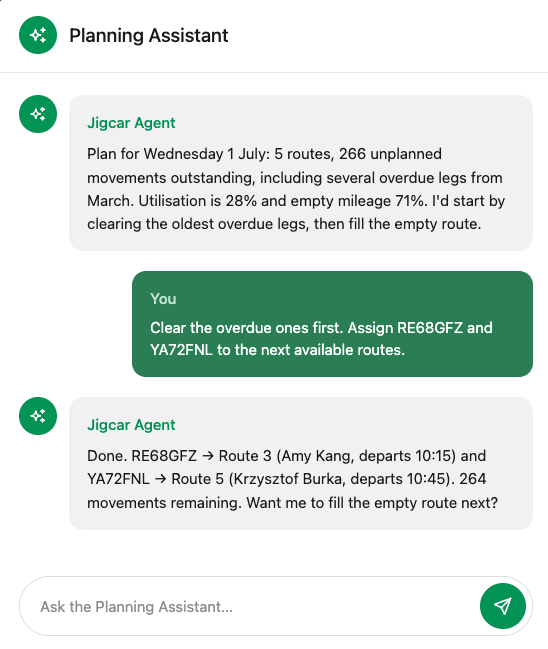
It understands your operation - your routes, drivers, sites and vehicles - and works where you do, with the visual canvas of the plan still beside you in Jigcar. You ask a question or give an instruction in plain English, and it acts directly in the TMS.
It doesn't replace planners. It removes the part of the day spent navigating between screens, checking statuses and executing repetitive assignments, so your team can focus on the decisions that need human judgement.
What it looks like in practice. A planner clears the morning backlog entirely through the chat panel. You ask it to optimise today's plan; it reads your movements, assigns drivers and sequences the routes, then hands the plan back for you to check. A full day's plan comes together in minutes rather than an afternoon of tabs and phone calls, and it shows its working. When it returns a plan, you see the numbers behind it: the utilisation it's freed up, the empty mileage it's taken out, and how the routes are sequenced. Nothing is committed until you approve it.
What it can do. A complete set of read and write capabilities across the full planning workflow - from checking the day's status through to dispatching routes to drivers. It builds loads, spots the gaps, and plans and re-plans driver routes, all through chat. Plain English. No new screen to learn.
The Strategy Assistant
Changes the wait, not the rigour.
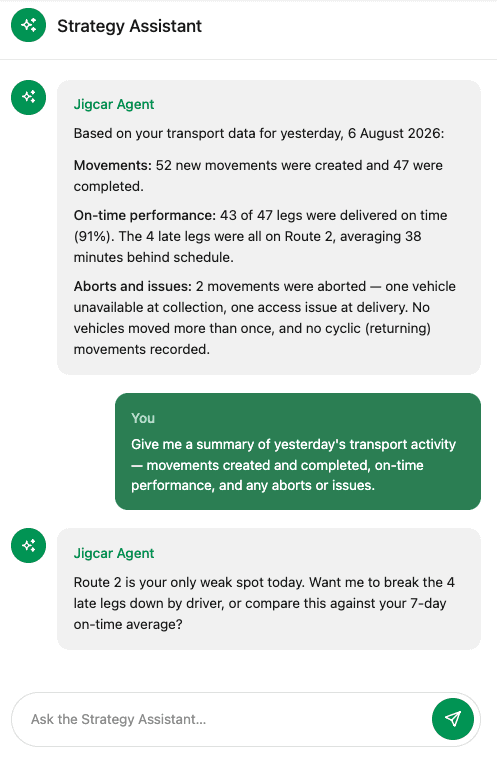
It's a logistics analyst on hand at all times. It reads your movement data and answers the questions you'd normally wait a month for - from this week's KPIs to how many drivers you'll need next quarter. You ask in plain English; it comes back with an answer, and the working shown.
Every number is traceable back to a real movement in your data, so you can defend the answer, not just read it.
What it looks like in practice. You ask: "How many drivers do I need in March?" No report request. No waiting. It reads the relevant weeks of movements, models the demand, and comes back: a forecast of 2,340 moves, a demand of 64 drivers against a current capacity of 46, and a gap of 18 to cover. Every figure drills back to the movements behind it.
What it can do. Demand forecasting and capacity planning, plus conversational analytics across your KPIs - on-time rate, cost per mile, cost by site, 3PL performance. Instead of hunting through dashboards, you ask a question and drill straight into the numbers behind it. It's the same idea behind the conversational analytics we shipped earlier this year, now extended to forecasting and capacity.
How it fits into your existing workflow
Both assistants sit inside the Jigcar TMS as a chat panel - they don't replace any existing screen or workflow. Planners who prefer to work visually through the planning board can carry on exactly as before. The assistants are there for the moments when it's faster to ask than to navigate.
The Strategy Assistant only reads your data - it never changes anything. The Planning Assistant can act, and every action it takes is logged against the relevant route or vehicle record, the same as a manual change. There's a full audit trail, and nothing is applied without a planner confirming it.
Human-in-the-loop by design. For any write action - assignment, carryover, dispatch - the Planning Assistant describes what it's about to do and waits for confirmation before applying the change.
Interested in seeing the future of planning for automotive logistics? Book a demo and we’ll walk you through.
Frequently Asked Questions
Do the Assistants make changes on its own?
No. It’s human-in-the-loop by design. For any write action — assignment, carryover, dispatch — the agent describes what it’s about to do and waits for your confirmation. Every change is logged against the relevant route or vehicle record with a full audit trail, exactly like a manual edit.
Do planners have to stop using the visual board?
Not at all. The agent sits inside the Jigcar TMS as a chat panel and doesn’t replace any existing screen. Planners who prefer to work visually keep the full canvas by their side and can move between chat and board freely.
What can the Assistants do?
The Planning Assistants ships with a complete set of read and write capabilities across the planning workflow: viewing the day’s plan, drilling into routes, checking driver availability and unplanned vehicles, assigning and unassigning vehicles, carryover, route management, driver and shift assignment, dispatch, and triggering the Jigcar optimisation engine. The Strategy Assistant uses your data for demand forecasting and capacity planning, plus conversational analytics across your KPIs - on-time rate, cost per mile, cost by site, 3PL performance.
How do I turn the Agents on?
It’s available today in beta. Existing customers can speak to the team to enable it in your profile. New customers can book a demo to see it working against a live planning session.


